I often get scripts for review, and several scripters without a scripting site of their own have asked me to publish their scripts on my site.
On the other hand, I get many many questions for support on the scripts I publish on my site.
I often need to read and reread my own scripts several times before I can recall the choices made and the code used when asked for support several years later.
I cannot guarantee I'll be able to fully understand and support code written by others, which could become a potential source for disappointments.
But it would be a shame not to publish these scripts.
Hence this page and the following disclaimer.
| Disclaimer: | |
| Disclaimer: | The following scripts are all created by visitors of my site, not by me. They are Third Party Scripts, "Not Invented Here". Questions about these scripts will be forwarded to the authors/creators if possible. |
Note from the author:
I created simple batch to randomly shuffle lines from input.
usage: type list.txt | shuffle.bat
- Shuffle.bat by Jiri Hofreiter
@ECHO OFF
SETLOCAL ENABLEDELAYEDEXPANSION
SET TmpFile=tmp%RANDOM%%RANDOM%.tmp
TYPE NUL >%Tmpfile%
FOR /F "tokens=*" %%i IN ('MORE') DO SET Key=!RANDOM!!RANDOM!!RANDOM!000000000000& ECHO !Key:~0,15!%%i>> %TmpFile%
FOR /F "tokens=*" %%i IN ('TYPE %TmpFile% ^| SORT') DO SET Line=%%i&ECHO.!Line:~15!
::DEL %TmpFile%
ENDLOCAL
Best regards,
Jiri Hofreiter
[ Back to the top of this page... ]
Note from the author:
I don't believe you have a script to determine what version of Windows you are running in CMD batch files.
So here you go:
- WinVer.bat by Denis St-Pierre
@ECHO OFF
:: By Denis St-Pierre

VER | FINDSTR /L "5.0." > NUL:
IF %ErrorLevel% EQU 0 ECHO Running 2000

VER | FINDSTR /L "5.1." > NUL:
IF %ErrorLevel% EQU 0 ECHO Running XP

VER | FINDSTR /L "5.2." > NUL:
IF %ErrorLevel% EQU 0 ECHO Running Win 2003

VER | FINDSTR /L "6.0." > NUL:
IF %ErrorLevel% EQU 0 (
	If EXIST %SystemRoot%\System32\ServerManagerLauncher.exe (
		ECHO Running Windows 2008R1
	) ELSE (
		ECHO Running Vista
	)
)

VER | FINDSTR /L "6.1." > NUL:
IF %ErrorLevel% EQU 0 (
	If EXIST %SystemRoot%\System32\ServerManagerLauncher.exe (
		ECHO Running Windows 2008R2
	) ELSE (
		ECHO Running Windows 7
	)
)
Denis St-Pierre
BTW: Nobody seems to have the Version numbers that show up when you type VERinCMDfor each version of Windows/DOS, not even wikipedia has this.
It sounds silly but it does come in handy at times.
I agree, a list with VER outputs for all Windows versions would be quite useful.
As would including the ServicePack information in VER's output - right now you get identical output for Windows XP "base" and XP SP3!
| Notes: | ||
| Notes: | 1 | To make Denis' code work in Windows 2000 you need to either install FINDSTR or use FIND (without the /L switch) instead. |
| 2 | If WMIC is available (Windows XP Professional and later) you can find the Windows and servicepack versions:WMIC OS Get Caption,CSDVersion,Version |
|
[ Back to the top of this page... ]
Note from the author:
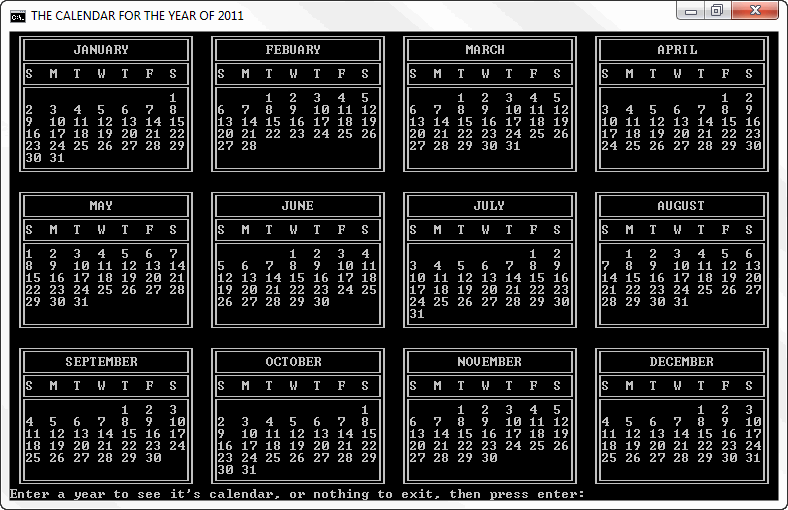
I wrote this script for something to use for work and thought other people might be interested in it, it generates a calender for an input year.
I have added a reasonable amount of comments to the script to make it easy to understand.As one of the comments states it's an xp batch file but looks like it should work for win 2000 and above but is untested.....
@ECHO OFF

:: Xp batch for generating calendars
:: Chances look good for win 2000 and above(untested)
:: By Judago, August 2009

IF "%~1"=="/?" (
    ECHO START "%~NX0" WITHOUT ARGUMENTS AND THEN ENTER THE YEAR.
    ECHO "%~NX0" WILL OPEN IN IT'S OWN WINDOW TO AVOID RESIZING
    ECHO AN EXISTING WINDOW.
    ECHO.
    ECHO A SCREEN RESOLUTION AND/OR FONT SIZE THAT CAN DISPLAY
    ECHO CMD WINDOWS OF 96 COLUMNS AND 39 LINES IS REQUIRED.
    ECHO SOME CONFIGURATIONS MAY USE SCROLL BARS TO ACHIEVE
    ECHO THIS.
    EXIT /B
)

:: The current codepage is stored in variable %CodePage%,
:: then changed to 850 to facilitate box drawing characters.....

FOR /F "tokens=*" %%A IN ('CHCP') DO FOR %%B IN (%%~A) DO SET CodePage=%%B
CHCP 850 >NUL 2>&1

:: The title can be used to falicitate custom window
:: positioning via the properties menu of "calendars..."
:: /max is used so as much content as possible is visable
:: without moving the window. /max must be removed for
:: custom window positing.....

IF NOT "%~1 %~2"=="WINDOW SIZE" (
	START "CALENDARS..." /MAX CMD /C "%~F0" WINDOW SIZE

	REM Restore the original codepage before exiting.....

	CHCP %CodePage% >NUL 2>&1
	EXIT /B
)
MODE CON:COLS=96 LINES=39
SETLOCAL ENABLEDELAYEDEXPANSION

:loop
FOR %%Z IN (jan feb mar apr may jun jul aug sep oct nov dec year day leap noleap length test) DO SET %%Z=
SET /P year=Enter a year to see it's calendar, or nothing to exit, then press enter:
IF NOT DEFINED year (

	REM Restore the original codepage before exiting.....

	CHCP %CodePage% >NUL 2>&1
	EXIT /B
)

::Test that the input is only numbers...

SET test=!year!
FOR /l %%Z IN (0 1 9) DO IF DEFINED test SET "test=!test:%%Z=!"
IF DEFINED test CLS&GOTO loop
:zero
IF NOT DEFINED year (
	:error
	cls
	echo The year entered can not be accepted.
	echo.
	pause
	CLS
	GOTO loop
)

:: remove leading zeros, if any...

IF "%year:~0,1%"=="0" SET year=%year:~1%&&GOTO zero

:: The %processor_architecture% test is used to test
:: limits of caculations, if the variable is undefined
:: or unrecognised the test will fall through and complete
:: anyway, if the limit is surpassed this way the results may
:: not be valid. The tested number is ~80% of the limit of the
:: os so that year + year / 4 yields a valid result.

IF /I "!processor_architecture!"=="x86" (
	IF !year! gtr 1717986917 GOTO :error
) else (
	IF NOT "!processor_architecture:64=!"=="!processor_architecture!" (
		IF !year! gtr 7378697629483820645 GOTO :error
	)
)

:: Generate the first day of the year, 0=sun, 1=mon,...,6=sat
:: A 365 day year ofsets by one day, so the next year will start
:: the next day (i.e. 2009 starts on thr and 2010 starts on fri)
:: an extra day must be added for every leapyear. Using modulo
:: 7 on the total of offset days reviels the starting day of the
:: year. one day must also be removed if the year is a leap year
:: because the below will add one for it, the remainder for non
:: leap years is not an issue because set /a only returns whole
:: numbers.

SET /A day=(year + year / 4) - (year / 100 - year / 400)
SET /A leap=year %% 400
SET /A noleap=year %% 100
IF !leap! GTR 0 (
	IF !noleap! NEQ 0 SET /A leap=year %% 4
)
IF %leap%==0 SET /A day-=1
SET /A day%%=7

:: For each year every month is padded to is starting offset
:: with spaces, january has the original offset generated above.
:: each additional offset is generated by adding the total days of
:: the previous month then processing it by modulo 7.
:: The days are stored in a varianle to display later, these variables
:: are padded to 111 characters using spaces for display purposes.

FOR %%U IN (jan feb mar apr may jun jul aug sep oct nov dec) DO (
	FOR %%V IN (jan mar may jul aug oct dec) DO IF /I %%U==%%V SET length=31
	FOR %%W IN (apr jun sep nov) DO IF /I %%U==%%W SET length=30
	IF /I %%U==feb (
		IF !leap!==0 (
			SET length=29
		) else (
			SET length=28
		)
	)
	FOR /l %%X IN (1 1 !day!) DO SET "%%U=!%%U!   "
	FOR /l %%Y IN (1 1 !length!) DO (
		IF %%Y lss 10 (
			SET "%%U=!%%U!%%Y  "
		) else (
			SET "%%U=!%%U!%%Y "
		)
	)
	FOR /l %%Z IN (!length! 1 54) DO IF "!%%U:~110!"=="" SET "%%U=!%%U! "
	SET /A day=^(day + length^) %% 7
)
:test

:: The results are displayed below using substrings of each month's
variable.

cls
TITLE THE CALENDAR FOR THE YEAR OF %YEAR%
echo. ╔════════════════════╗  ╔════════════════════╗  ╔════════════════════╗  ╔════════════════════╗
echo. ║      JANUARY       ║  ║      FEBUARY       ║  ║       MARCH        ║  ║       APRIL        ║
echo. ╠════════════════════╣  ╠════════════════════╣  ╠════════════════════╣  ╠════════════════════╣
echo. ║S  M  T  W  T  F  S ║  ║S  M  T  W  T  F  S ║  ║S  M  T  W  T  F  S ║  ║S  M  T  W  T  F  S ║
echo. ╠════════════════════╣  ╠════════════════════╣  ╠════════════════════╣  ╠════════════════════╣
echo. ║%JAN:~0,20%║  ║%FEB:~0,20%║  ║%MAR:~0,20%║  ║%APR:~0,20%║
echo. ║%JAN:~21,20%║  ║%FEB:~21,20%║  ║%MAR:~21,20%║  ║%APR:~21,20%║
echo. ║%JAN:~42,20%║  ║%FEB:~42,20%║  ║%MAR:~42,20%║  ║%APR:~42,20%║
echo. ║%JAN:~63,20%║  ║%FEB:~63,20%║  ║%MAR:~63,20%║  ║%APR:~63,20%║
echo. ║%JAN:~84,20%║  ║%FEB:~84,20%║  ║%MAR:~84,20%║  ║%APR:~84,20%║
echo. ║%JAN:~105%              ║  ║%FEB:~105%              ║  ║%MAR:~105%              ║  ║%APR:~105%              ║
echo. ╚════════════════════╝  ╚════════════════════╝  ╚════════════════════╝  ╚════════════════════╝
echo.
echo. ╔════════════════════╗  ╔════════════════════╗  ╔════════════════════╗  ╔════════════════════╗
echo. ║        MAY         ║  ║        JUNE        ║  ║        JULY        ║  ║       AUGUST       ║
echo. ╠════════════════════╣  ╠════════════════════╣  ╠════════════════════╣  ╠════════════════════╣
echo. ║S  M  T  W  T  F  S ║  ║S  M  T  W  T  F  S ║  ║S  M  T  W  T  F  S ║  ║S  M  T  W  T  F  S ║
echo. ╠════════════════════╣  ╠════════════════════╣  ╠════════════════════╣  ╠════════════════════╣
echo. ║%MAY:~0,20%║  ║%JUN:~0,20%║  ║%JUL:~0,20%║  ║%AUG:~0,20%║
echo. ║%MAY:~21,20%║  ║%JUN:~21,20%║  ║%JUL:~21,20%║  ║%AUG:~21,20%║
echo. ║%MAY:~42,20%║  ║%JUN:~42,20%║  ║%JUL:~42,20%║  ║%AUG:~42,20%║
echo. ║%MAY:~63,20%║  ║%JUN:~63,20%║  ║%JUL:~63,20%║  ║%AUG:~63,20%║
echo. ║%MAY:~84,20%║  ║%JUN:~84,20%║  ║%JUL:~84,20%║  ║%AUG:~84,20%║
echo. ║%MAY:~105%              ║  ║%JUN:~105%              ║  ║%JUL:~105%              ║  ║%AUG:~105%              ║
echo. ╚════════════════════╝  ╚════════════════════╝  ╚════════════════════╝  ╚════════════════════╝
echo.
echo. ╔════════════════════╗  ╔════════════════════╗  ╔════════════════════╗  ╔════════════════════╗
echo. ║     SEPTEMBER      ║  ║      OCTOBER       ║  ║      NOVEMBER      ║  ║      DECEMBER      ║
echo. ╠════════════════════╣  ╠════════════════════╣  ╠════════════════════╣  ╠════════════════════╣
echo. ║S  M  T  W  T  F  S ║  ║S  M  T  W  T  F  S ║  ║S  M  T  W  T  F  S ║  ║S  M  T  W  T  F  S ║
echo. ╠════════════════════╣  ╠════════════════════╣  ╠════════════════════╣  ╠════════════════════╣
echo. ║%SEP:~0,20%║  ║%OCT:~0,20%║  ║%NOV:~0,20%║  ║%DEC:~0,20%║
echo. ║%SEP:~21,20%║  ║%OCT:~21,20%║  ║%NOV:~21,20%║  ║%DEC:~21,20%║
echo. ║%SEP:~42,20%║  ║%OCT:~42,20%║  ║%NOV:~42,20%║  ║%DEC:~42,20%║
echo. ║%SEP:~63,20%║  ║%OCT:~63,20%║  ║%NOV:~63,20%║  ║%DEC:~63,20%║
echo. ║%SEP:~84,20%║  ║%OCT:~84,20%║  ║%NOV:~84,20%║  ║%DEC:~84,20%║
echo. ║%SEP:~105%              ║  ║%OCT:~105%              ║  ║%NOV:~105%              ║  ║%DEC:~105%              ║
echo. ╚════════════════════╝  ╚════════════════════╝  ╚════════════════════╝  ╚════════════════════╝
GOTO loop
The output for 2011 looks like this:
| Notes: | ||
| Notes: | 1 | For box drawing characters it is essential to choose the proper codepage. In this batch file, that is done by the lines: FOR /F "tokens=*" %%A IN ('CHCP') DO FOR %%B IN (%%~A) DO SET CodePage=%%BThe first line saves the current codepage in a variable %CodePage%, the second sets the codepage to 850. Before exiting the batch file, the original codepage is restored: CHCP %CodePage% >NUL 2>&1 |
| 2 | Special thanks for Wikipedia, I couldn't have written the HTML and PHP code to correctly display the source code without their Box drawing characters page. | |
[ Back to the top of this page... ]
Whenever I need to know what removable devices are available, I use the following command:
ECHO List Volume | DISKPART | FIND /I "Removeable"
| Note: | |
| Note: | Some Windows versions use the word "Removable", others use "Removeable" (note the extra "e" in the latter). To circumvent problems, replace FIND /I "Removeable" with FINDSTR /R /I /C:"Remove?able" |
The DISKPART command will show a list like this:
Volume 7     J                       Removeable      0 B
Volume 8     K                       Removeable      0 B
Volume 9     L                       Removeable      0 B
Volume 10    M                       Removeable      0 B
However, as Carlitos pointed out, this command requires administrative privileges.
Carlitos needed "ordinary users" to list their removable drives and came up with the following solution:
:: DETECTOR OF REMOVABLE DEVICES [V5.0c Final] author Carlitos.dll
:: carlitosdll.blogspot.com
:: Tested in Windows 2000 and XP. Doesn't work in Windows 98 and ME.

@ECHO OFF
IF NOT "%OS%"=="Windows_NT" GOTO Other

ECHO Mounted removable devices detected
ECHO.----------------------------------

VER | FIND "NT"   >NUL && GOTO NT2000
VER | FIND "2000" >NUL && GOTO NT2000

:XPVISTASEVEN
FOR /F "tokens=3 delims=\:" %%A IN ('REG Query HKLM\SYSTEM\MountedDevices ^| FIND "530054004F00520041"') DO (
	DIR /A %%A:\ >NUL 2>&1 && ECHO.%%A:
)
GOTO:EOF

:NT2000
START /WAIT REGEDIT /E "%Temp%\devices.dat" "HKEY_LOCAL_MACHINE\SYSTEM\MountedDevices"
FOR /F "tokens=3 delims=\:" %%A IN ('TYPE "%Temp%\devices.dat" ^| FINDSTR /R /B /I /C:"\"\\\\DosDevices\\\\[A-Z]:\"=hex:.*,53,00,54,00,4f,00,52,00,41"') DO (
	DIR /A %%A:\ >NUL 2>&1 && ECHO.%%A:
)
DEL /F /Q "%Temp%\devices.dat" >NUL 2>&1
GOTO:EOF

:Other
ECHO Current batch is not supported in this Operating System version.
[ Back to the top of this page... ]
Note from the author:
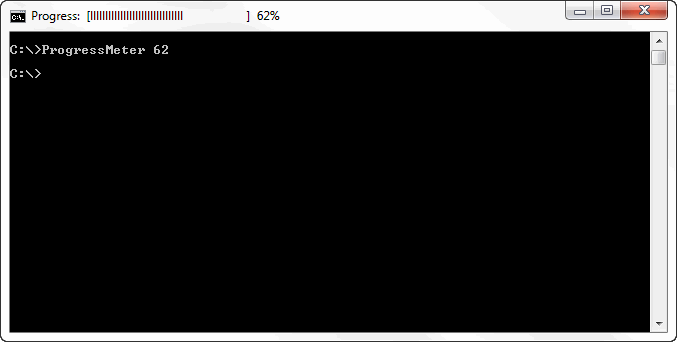
This script takes a variable passed to it containing the current progress in percent (0 to 100) and it displays a progress bar followed by a numerical percentage in the title bar, then returns control back to the calling script or routine.
This meter stays visible and is unaffected by scrolling text in the Command Prompt window and adds a negligible delay to the continued execution of the main script.
It can be called as often or seldom as desired during the execution of the main script and can be passed the current status in any regular or irregular increment.
This has been tested in Windows XP, 2000 and 2003.
Note that depending on the active title bar font selected, a lower case "L" (l) may appear better than the uppercase "i" (I) used in the script.For an example, save it to your current directory (as ProgressMeter.bat) and call it from a Command Prompt window like this:
ProgressMeter.bat 62It should display a progress meter in the title bar which is 62% filled, followed by the text "62%":
- ProgressMeter.bat by Roy Holt
@ECHO OFF
:: ******************************************************************
:ProgressMeter
:: 2007_01_10 by rholt
:: core2quad@rogers.com
:: This subroutine displays a progress meter in the titlebar of
:: the current CMD shell window.
::
:: Input: %1 must contain the current progress (0-100)
:: Return: None
:: ******************************************************************
:: Calculate the number of vertical bars then spaces based on the percentage value passed
SETLOCAL ENABLEDELAYEDEXPANSION
SET ProgressPercent=%1
SET /A NumBars=%ProgressPercent%/2
SET /A NumSpaces=50-%NumBars%

:: Clear the progress meter image
SET Meter=

:: Build the meter image using vertical bars followed by trailing spaces
:: Note there is a trailing space at the end of the second line below
FOR /L %%A IN (%NumBars%,-1,1) DO SET Meter=!Meter!I
FOR /L %%A IN (%NumSpaces%,-1,1) DO SET Meter=!Meter!

:: Display the progress meter in the title bar and return to the main program
TITLE Progress:  [%Meter%]  %ProgressPercent%%%
ENDLOCAL
GOTO :EOF
This batch file is intended to be used as a subroutine in other batch files to give these a more professional look.
When you do use it, please include the complete header with credits plus the source URL: https://www.robvanderwoude.com/3rdpartybatchfiles.php#ProgressMeter
[ Back to the top of this page... ]
Note from the author:
I just started to build a script to gather userdetails from all users in a domain based on your script disabled.bat.
But i guess i found a small "issue" when a user has a blank in his username.
[...]
It does work, but i don't know how the "net user /domain" output would look like if a username is longer than 25 characters.
[...]
To start gathering the details to all users in the domain, execute GetAllUserDetails.bat.
This script calls GetUserDetails.bat which actually does the extraction.
You can also use GetUserDetails.bat as standalone. To do this just pass the username you want to check as a parameter.
e.g.GetUserDetails.bat robvanderwoude
I don't know about the long account names either, as I don't have access to NT 4 systems anymore.
But if I recall correctly, I think there used to be a 16 character limit on NT 4 account names.
@ECHO OFF
ECHO.>CON
ECHO GetAllUserDetails, Version 1.00 for Windows NT 4 and higher >CON
ECHO Gathers details to all users in the domain >CON
ECHO.>CON
ECHO Based on a script by Rob van der Woude >CON
ECHO http://www.robvanderwoude.com >CON
ECHO.>CON
ECHO Gathering data, this may take several minutes . . .>CON
ECHO.>CON
ECHO.

Set Counter=0

FOR /F "skip=4 tokens=*" %%A IN ('NET USER /DOMAIN ^| FIND /V "The command completed successfully"') DO CALL :ParseUsers %%A
GOTO:EOF


:ParseUsers
Set FullLine=%*

echo Getting details from %1...
SET UserName=%FullLine:~0,24%
start /wait GetUserDetails.bat %UserName%


echo Getting details for user %1...
SET UserName=%FullLine:~25,24%
start /wait GetUserDetails.bat %UserName%


echo Getting details from %1...
SET UserName=%FullLine:~50,100%
start /wait GetUserDetails.bat %UserName%

set /a Counter = Counter + 3

echo.
echo Done!
echo Details to approximately %Counter% users were extracted!
pause
@ECHO OFF

IF "%~1"=="" (
	cls
	echo "Please enter the username you want to check!"
	pause
	goto _end
)

Set UserToCheck=%~1


echo Getting details for user %UserToCheck%...

rem Getting and saving the userdata to extract all details from this file
NET USER %UserToCheck% /DOMAIN > userinfo.txt

Set Delimiter=!

Set UserName=
Set FullName=
Set Comment=
Set AccountActive=0
Set AccountExpires=
Set PwdLastSet=
Set PwdExpires=
Set PwdChangeable=
Set PwdRequired=
Set UserMayChangePwd=0
Set WrkStatAllowed=
Set LogonScript=
Set UserProfile=
Set HomeDir=
Set LastLogon=
Set LogonHoursAllowed=

rem User name
rem parse userinfo.txt for the string "User name" and store this line in %UserName%
rem to extract just the content, we cut the first 29 characters of the line
FOR /F "delims=" %%A IN ('type userinfo.txt ^| FIND "User name"') DO SET UserName=%%A
SET UserName=%UserName:~29,100%

rem Full Name
FOR /F "delims=" %%A IN ('type userinfo.txt ^| FIND "Full Name"') DO SET FullName=%%A
SET FullName=%FullName:~29,100%

rem Comment
FOR /F "delims=" %%A IN ('type userinfo.txt ^| FIND "Comment"') DO SET Comment=%%A
SET Comment=%Comment:~29,100%

rem Account active
FIND "Account active               Yes" userinfo.txt >NUL
IF NOT ERRORLEVEL 1 set AccountActive=1

rem Account expires
FOR /F "delims=" %%A IN ('type userinfo.txt ^| FIND "Account expires"') DO SET AccountExpires=%%A
SET AccountExpires=%AccountExpires:~29,100%


rem Password last set
FOR /F "delims=" %%A IN ('type userinfo.txt ^| FIND "Password last set"') DO SET PwdLastSet=%%A
SET PwdLastSet=%PwdLastSet:~29,100%

rem Password expires
FOR /F "delims=" %%A IN ('type userinfo.txt ^| FIND "Password expires"') DO SET PwdExpires=%%A
SET PwdExpires=%PwdExpires:~29,100%

rem Password changeable
FOR /F "delims=" %%A IN ('type userinfo.txt ^| FIND "Password changeable"') DO SET PwdChangeable=%%A
SET PwdChangeable=%PwdChangeable:~29,100%

rem Password required
FOR /F "delims=" %%A IN ('type userinfo.txt ^| FIND "Password required"') DO SET PwdRequired=%%A
SET PwdRequired=%PwdRequired:~29,100%

rem User may change password
FIND "User may change password     Yes" userinfo.txt >NUL
IF NOT ERRORLEVEL 1 set UserMayChangePwd=1


rem Workstations allowed
FOR /F "delims=" %%A IN ('type userinfo.txt ^| FIND "Workstations allowed"') DO SET WrkStatAllowed=%%A
SET WrkStatAllowed=%WrkStatAllowed:~29,100%

rem Logon script
FOR /F "delims=" %%A IN ('type userinfo.txt ^| FIND "Logon script"') DO SET LogonScript=%%A
SET LogonScript=%LogonScript:~29,100%

rem User profile
FOR /F "delims=" %%A IN ('type userinfo.txt ^| FIND "User profile"') DO SET UserProfile=%%A
SET UserProfile=%UserProfile:~29,100%

rem Home directory
FOR /F "delims=" %%A IN ('type userinfo.txt ^| FIND "Home directory"') DO SET HomeDir=%%A
SET HomeDir=%HomeDir:~29,100%

rem Last logon
FOR /F "delims=" %%A IN ('type userinfo.txt ^| FIND "Last logon"') DO SET LastLogon=%%A
SET LastLogon=%LastLogon:~29,100%


rem Logon hours allowed
FOR /F "delims=" %%A IN ('type userinfo.txt ^| FIND "Logon hours allowed"') DO SET LogonHoursAllowed=%%A
SET LogonHoursAllowed=%LogonHoursAllowed:~29,100%


rem === Output ===
rem ==============
IF NOT EXIST UserDetailList.txt (
  echo UserName %Delimiter% FullName %Delimiter% Comment %Delimiter% AccountActive %Delimiter% AccountExpires %Delimiter% PwdLastSet %Delimiter% PwdExpires %Delimiter% PwdChangeable %Delimiter% PwdRequired %Delimiter% UserMayChangePwd %Delimiter% WrkStatAllowed %Delimiter% LogonScript %Delimiter% UserProfile %Delimiter% HomeDir %Delimiter% LastLogon %Delimiter% LogonHoursAllowed > UserDetailList.txt
)

echo %UserName%%Delimiter%%FullName%%Delimiter%%Comment%%Delimiter%%AccountActive%%Delimiter%%AccountExpires%%Delimiter%%PwdLastSet%%Delimiter%%PwdExpires%%Delimiter%%PwdChangeable%%Delimiter%%PwdRequired%%Delimiter%%UserMayChangePwd%%Delimiter%%WrkStatAllowed%%Delimiter%%LogonScript%%Delimiter%%UserProfile%%Delimiter%%HomeDir%%Delimiter%%LastLogon%%Delimiter%%LogonHoursAllowed% >> UserDetailList.txt

echo done
exit

:_end
| Note: | |
| Note: | These scripts will fail on non-English Windows versions. |
For Active Directory based domains, the recommended way to list user account details would be the use of the DS Tools DSQUERY and DSGET.
These tools are language independent, and spaces or "special" characters in account names or properties are no problem.
💾 Download GetAllUserDetails.bat and GetUserDetails.bat
[ Back to the top of this page... ]
Note from the author:
I recently needed to display return codes (errorlevels) in hexidecimal format. So I wrote a little script to do it. I could have done it quicker with javascript, but wanted to use strict cmd sripting. So here it is.
- DecToHex3P.bat by Richard K. Bussey
::::::::::::::::::::::::::::::::::::::::::::::::::::::::::::::::::::::::::::::
::                                                                          ::
::  DecToHex.cmd                                                            ::
::                                                                          ::
::       Author: Richard K. Bussey, Copyright All Rights Reserved           ::
::        EMail: rkb@binary-construction.com                                ::
::         Date: 08.24.06                                                   ::
::                                                                          ::
::  Description: Convert a passed decimal value to its hexidecimal          ::
::               equivalent.                                                ::
::                                                                          ::
::      History:                                                            ::
::                                                                          ::
::::::::::::::::::::::::::::::::::::::::::::::::::::::::::::::::::::::::::::::

@echo off
echo DecToHex.cmd v1.0
echo Copyright: 2006, Richard K. Bussey; All Rights Reserved
echo.
setlocal

::
:: If no command line options specified go immediately to SYNTAX
::
if "%1"=="" goto SYNTAX

::
:: Set Global Defaults
::
set QUIET=FALSE
set DEBUG=FALSE
set SEPERATOR=FALSE
set /a Value=-1

::
:: Parse Command Line
::
:PARSE
if /i "%1"=="" goto ENDPARSE
if /i "%1"=="-d" (echo on & set DEBUG=TRUE)
if /i "%1"=="-v" (if "%2"=="" (goto SYNTAX) else (set /a Value=%2))
if /i "%1"=="-u" (set UPPER=TRUE)
if /i "%1"=="-e" (if "%2"=="" (goto SYNTAX) else (set ENVVARIABLE= %~2))
if /i "%1"=="-q" (set QUIET=TRUE)
if /i "%1"=="-s" (set SEPERATOR=TRUE)
shift
goto PARSE
:ENDPARSE

if "%Value%" equ "-1" @echo Value (-v n) required! & goto SYNTAX
if "%DEBUG%"=="" @echo off

::
:: DOS has 32 bit precision
::
set /a POSITION=8
set /a OriginalValue=Value

::
:: Convert decimal values up to 268435455 (0xfffffff)
::
if %Value% gtr 0xfffffff echo Value too large! & goto FINISH
if %Value% gtr 0xffffff set /a Divisor=16777216 & goto LOOP
if %Value% gtr 0xfffff set /a Divisor=1048576 & goto LOOP
if %Value% gtr 0xffff set /a Divisor=65536 & goto LOOP
if %Value% gtr 0xfff set /a Divisor=4096 & goto LOOP
if %Value% gtr 0xff set /a Divisor=256 & goto LOOP
if %Value% gtr 0xf set /a Divisor=16 & goto LOOP
set /a Divisor=1

:LOOP
if %Divisor% equ 1 goto HEX
:HEX
set /a POSITION=%POSITION% - 1
set /a p="Value/Divisor"
if %p% equ 0xf (if "%UPPER%"=="TRUE" (set p%POSITION%=F) else (set p%POSITION%=f))
if %p% equ 0xe (if "%UPPER%"=="TRUE" (set p%POSITION%=E) else (set p%POSITION%=e))
if %p% equ 0xd (if "%UPPER%"=="TRUE" (set p%POSITION%=D) else (set p%POSITION%=d))
if %p% equ 0xc (if "%UPPER%"=="TRUE" (set p%POSITION%=C) else (set p%POSITION%=c))
if %p% equ 0xb (if "%UPPER%"=="TRUE" (set p%POSITION%=B) else (set p%POSITION%=b))
if %p% equ 0xa (if "%UPPER%"=="TRUE" (set p%POSITION%=A) else (set p%POSITION%=a))
if %p% lss 0xa (set p%POSITION%=%p%)
if %Divisor% equ 1 goto DISPLAY
:CONTINUE
set /a Value=%Value% - (%p% * %Divisor%)
set /a Divisor=%Divisor% / 16
goto LOOP

:DISPLAY
if %QUIET% equ FALSE (
 if %POSITION% lss 4 (
  if %SEPERATOR% equ TRUE (
   echo Value: %OriginalValue%; HEX: 0x%p7%%p6%%p5%:%p4%%p3%%p2%%p1%
  ) else (
   echo Value: %OriginalValue%; HEX: 0x%p7%%p6%%p5%%p4%%p3%%p2%%p1%
  )
 ) else (
  if %SEPERATOR% equ TRUE (
   echo Value: %OriginalValue%; HEX: 0x%p7%%p6%:%p5%%p4%
  ) else (
   echo Value: %OriginalValue%; HEX: 0x%p7%%p6%%p5%%p4%
  )
 )
)
if "%ENVVARIABLE%" NEQ "" (
 endlocal
 if %POSITION% lss 4 (
  if %SEPERATOR% equ TRUE (
   set %ENVVARIABLE%=0x%p7%%p6%%p5%:%p4%%p3%%p2%%p1%
  ) else (
   set %ENVVARIABLE%=0x%p7%%p6%%p5%%p4%%p3%%p2%%p1%
  )
 ) else (
  if %SEPERATOR% equ TRUE (
   set %ENVVARIABLE%=0x%p7%%p6%:%p5%%p4%
  ) else (
   set %ENVVARIABLE%=0x%p7%%p6%%p5%%p4%
  )
 )
)
goto FINISH

:SYNTAX
echo DecToHex -v n [-d] [-u] [-e] [-q] [-s]
echo.
echo    v   Decimal value to convert; where n is the decimal value
echo.
echo    d   Turn debugging on (turn echo on; display all commands)
echo.
echo    u   Show Hex values in upper-case
echo.
echo    e   Save Hex value in provided Environment Variable
echo.
echo    q   Quiet mode (do not display results)
echo.
echo    s   Enable seperator (:) in Hex value
echo.
echo i.e. DecToHex -v 23452234 -u

:FINISH
Richard K. Bussey
[ Back to the top of this page... ]
Note from the author:
Script will automatically enumerate and scan all authorized DHCP servers on the domain, creating a log of all active scopes.
Windows Server 2003 only.
Useful for finding the current list of user subnets in a large Active Directory network, for deploying to/scanning etc.
Keep in mind, if there is a network outage when run some sites won't show up, but all errors will be logged.
- DHCPScopes.bat by Josh Murray
@ECHO OFF
REM Obtains all active DHCP Scopes authorized in the domain
REM Josh Murray V. 6.8.18

SETLOCAL ENABLEDELAYEDEXPANSION

ECHO dhcp > script2.txt
ECHO set file open dhcp.txt >> script2.txt

REM Import DHCP Servers
ECHO dhcp > script1.txt
ECHO set file open temp.txt >> script1.txt
ECHO show server >> script1.txt
ECHO exit >> script1.txt
NETSH -f script1.txt >nul

REM Check if servers are reachable
CLS
ECHO Scanning Servers
ECHO Server not responding (If name is Address, there is a blank entry in AD) :> error.log

FOR /F "tokens=2 delims=[]" %%A in (temp.txt) DO (
	PING -n 2 %%A | FIND "TTL=" >NUL
	IF !ERRORLEVEL! NEQ 0 (
		ECHO Server unreachable %%A >> error.log
	) ELSE (
		ECHO server \\%%A >> script2.txt
		ECHO show scope >> script2.txt
	)
)

ECHO exit >> script2.txt

REM Get scopes
CLS
ECHO Enumerating Scopes
NETSH -f script2.txt >NUL

REM Cleanup Logs
TYPE dhcp.txt | FIND "Active" > Scopes.txt
ECHO ******************************>> error.log
ECHO DHCP Service may be disabled: >> error.log
TYPE dhcp.txt | FIND "Unable to determine" >> error.log

DEL temp.txt
DEL script*

CLS
ECHO Complete, Check Scopes.txt for DHCP scopes and error.log for failed connections.
ENDLOCAL
PAUSE
Sample Error.log:
Server not responding:
Server unreachable serverx1.test.com
Server unreachable serverx2.test.com
Server unreachable serverx3.test.com
Server unreachable serverx4.test.com
Server unreachable serverx5.test.com
Server unreachable serverx6.test.com
******************************
DHCP Service may be disabled:
Unable to determine the DHCP Server version for the Server 10.1.1.10
Unable to determine the DHCP Server version for the Server 10.2.1.11
Sample Scopes.txt:
 10.12.0.0     - 255.255.0.0    -Active       -Name            -Description
 10.17.8.0     - 255.255.255.0  -Active       -e.g. Corp Users -Non IT users
 10.12.47.0    - 255.255.255.0  -Active       -                -
 10.5.5.0      - 255.255.255.0  -Active       -                -
 10.19.5.0     - 255.255.255.0  -Active       -                -
Dhcp.txt has the unparsed log, which I personally leave in case I need more info than this, but could delete it as well, as the real purpose is to just display all active scopes, which is very useful when you have hundreds of servers.
Josh Murray
I didn't test this script myself.
The usual warnings apply, as always: "use at your own risk" and "test, test, test and test".
[ Back to the top of this page... ]
Note from the author:
I was scripting in Windows 2003 and discovered a method for obtaining a CR with no LF. It only works in XP and 2003 WITH delayed expansion turned on, but I was running a FOR loop with 'IPCONFIG' as the command I was parsing. My results ended up getting displayed all weird with one of the results at the left of my screen overwriting some of my echo'd statements. I started trying to capture the output that IPCONFIG was displaying and came up with this:
- Twirly.bat by Brian Williams
@ECHO OFF
REM By Brian Williams
REM hieyeque1@gmail.com

SETLOCAL ENABLEEXTENSIONS
SETLOCAL ENABLEDELAYEDEXPANSION

CALL :GETCR
CALL :TWIRLY
GOTO :END

:TWIRLY
SET _SPINNERS=7
SET _SPIN=30
SET /P _DUM =Check this out   ...!_CR!<NUL
PING 127.0.0.1>NUL
SET /P _DUM =Who hoo...........................                               !_CR!<NUL
FOR /L %%A IN (1,1,!_SPINNERS!) DO (
	SET _PIPE=!_PIPE!^|
	SET _SLASH=!_SLASH!/
	SET _DASH=!_DASH!-
	SET _WHACK=!_WHACK!\
	FOR /L %%B IN (1,1,!_SPIN!) DO (
		FOR %%C IN (^!_PIPE! !_SLASH! !_DASH! !_WHACK!) DO (
			SET /P _DUM=Spin'em -----------------------------------           %%C!_CR!<NUL
			PING 127.0.0.1 -n 1 >NUL
			PING 127.0.0.1 -n 1 >NUL
		)
	)
)
ECHO Ok, that's enough.
PING 127.0.0.1>NUL
GOTO :EOF


:GETCR
rem subroutine returns a variable called _cr that contains the carriage return
FOR /F "TOKENS=*" %%A IN ('IPCONFIG') DO (
	SET _CR=%%A
)
SET _CR=!_CR:~-1!
GOTO :EOF

:END
Brian Williams
Now this is what I call creative scripting.
You have to see it to believe it.
Too bad it only works in Windows XP and Server 2003.
Use the download link to download the code, as some browsers may remove the trailing spaces, that are absolutely required in this case.
Problems were also reported with wrong carets in copied and pasted code, so again, please use the download link to download the code.
[ Back to the top of this page... ]
@ECHO OFF
REM Written by Willi Huber
REM w.huber@sonplas.de

REM  ----------------------------------------
REM  6. Windows XP FireWall: open Port 3306 for MySQL-database.

REM  skip Windows 2000
ver | find /I "Windows XP" > nul
if ERRORLEVEL 1 Goto Terminate

REM  ...in Windows XP SP1 firewall does not exist.
netsh.exe help | find /I "firewall" > nul
if errorlevel 1 Goto Terminate

REM  try to open the port
netsh.exe firewall add portopening protocol=TCP port=3306 name=MySQL > nul
if errorlevel 1 Goto Step6Error
ECHO Step 6 Windows XP FireWall: Port 3306 for MySQL-database opened.
Goto Terminate

REM  ErrorHandling
:Step6Error
ECHO Step 6 Windows XP FireWall: Error while opening Port 3306 for MySQL-database !
Goto Terminate

:Terminate
REM  ----------------------------------------
[ Back to the top of this page... ]
Always assigns the drive letter U: to a USB-stick.
Notes from the author:
Connect always drive U: to the USBpen
Connect always (a second) driveletter U: to a USBpen.
Windows automatically assigns a free drive letter to a USB device.
If you want for some reasson that the user always works on the same driveletter U: you can put the files: "AutoRun.inf", "Make-U.bat" and "Make-U.ico" in the root of the USBpen. For a different diveletter you can mainipulate the driveletter as given in the batchfile "Make-U.bat". You can also use "AutoRun.inf" to start an application form or on the USBpen.
Put the USBpen in the computer:
in the "POPup" [Connect USBpen to U:] klick [OK]
OS: Windows XP + SP2 (SP1 don't start autorun on a USB device)If you are happy with this tool let me know:
EMail: j_vd_esch@hotmail.com.
- autorun.inf
[autorun] ACTION=Connect USBpen to U: OPEN=Make-U.bat ICON=Make-U.ico- Make-U.bat
@echo off cls subst U: \. cls- Make-U.ico
💾 Download USB-driveletter.bat
[ Back to the top of this page... ]
@ECHO OFF
CLS
REM  MVol-E ( v2.1 release 1-1-2006 )
REM  ~~~~~~~~~~~~~~~~~~~~~~~~~~~~~~~~
REM
REM  This program remounts any PHYSICAL volume from the
REM  letter E: to the first available letter R:, T:, V: or X:
REM
REM  Writen by: Jos van der Esch
REM  E-Mail   : j_vd_esch@hotmail.com
REM
REM *** Check if volume E is in use ***
SET DRVE=?
FOR %%a IN (E) DO (MOUNTVOL %%a: /L >NUL 2>&1 || SET DRVE=%%a:)
IF "%DRVE%"=="?" GOTO BEGIN
GOTO READY
:BEGIN
REM *** Read actual register DriveKey of volume E ***
SET DKEY=?
FOR /F "delims=" %%x IN ('MOUNTVOL E: /L') DO SET DKEY=%%x
REM *** Find first available Free Drive letter ***
SET FDRV=?
FOR %%b IN (X V T R) DO (MOUNTVOL %%b: /L >NUL 2>&1 || SET FDRV=%%b:)
REM *** Check settings ***
IF "%DKEY%"=="?" GOTO READY
IF "%FDRV%"=="?" GOTO READY
REM *** Delete volume E and move it to a new volume ***
MOUNTVOL E: /D
MOUNTVOL %FDRV% %DKEY%
GOTO READY
:READY
CLS
EXIT
Notes from the author:
Windows automatically assigns a drive letter to a USB device, without checking network mappings to see if a drive letter is really available. One solution to this problem is to start using drive letters high in the alphabet, but many environments use F: as the first mapped network drive.
Problem: USB devices are not available because they are mapped to the same drive as a network mapping. You cannot expect users to disconnect drives. In a locked-down environment, you might simply want to disable the use of USB storage devices. You can use XP's disk management to assign a different drive letter to the device, which will be remembered. Instead of changing the mapped drive letter of your USB hdd, you can change for example the drive letter that is used by your CD-Player.
Supported OS: Windows XP (Prof)
MVol-E remounts automatically any physical volume from the letter E: to the first available letter R:, T:, V: or X:.
If you are happy with this tool let me know:
EMail: j_vd_esch@hotmail.com.
[ Back to the top of this page... ]
:: GROUNDHOG.BAT
::   Groundhog
::
::      By Wronski
::        (with some recycling from stuff in
::             www.chebucto.ns.ca/~ak621/dos/bat.adv.htm
::         and Yesterday.bat  by Rob van der Woude
::             http://www.robvanderwoude.com)
::
:: USAGE: groundhog [file] [date]  will run [file] set at date [date]
:: Default values will be used if no [file] or [date] given

@echo off
SETLOCAL

::dafault file
set file=C:\wherever\whatever.exe
::default date
set Fakedate=09/07/2003

if %1a==a goto default
set file=%1
if %2a==a goto default
set Fakedate=%2

:default

SET today=%date:~4,10%
date=%Fakedate%

CALL %file%

:daycount
If NOT "%date:~4,10%"=="%Fakedate%" (
SET vardate = %Fakedate%
CALL :addday
SET Fakedate=%NextDate%
SET vardate = %today%
CALL :addday
SET today=%NextDate%
goto daycount
)

date=%today% 	 ::restore previous date
ENDLOCAL
GOTO:EOF

:: * * * * * * * *  Subroutines  * * * * * * * *

:addday

:: Parse the day

SET Day=%date:~7,2%
SET Month=%date:~4,2%
SET Year=%date:~10,4%

SET NexTD=
SET NextM=
SET NextY=

:: Strip leading zeros
SET DayS=%Day%
IF %Day:~0,1%==0 SET DayS=%Day:~1%
SET MonthS=%Month%
IF %Month:~0,1%==0 SET MonthS=%Month:~1%

:: Calculate next day's date

SET /A NextD=%DayS% + 1
SET NextM=%MonthS%
SET NextY=%Year%

IF %DayS% EQU 31 (
	SET NextD=1
	Call :ChangeYear
)

IF %DayS% EQU 30 (
	SET NextY=%Year%
	CALL :ChangeMonth
)

IF "%MonthS%/%DayS%"=="2/28" CALL :LeapYear

:: Add leading zeros to NextD and NextM if necessary
IF %NextD% LSS 10 SET NextD=0%NextD%
IF %NextM% LSS 10 SET NextM=0%NextM%

:: Nextday's date in MM/DD/YYYY format
SET NextDate=%NextM%/%NextD%/%NextY%

GOTO:EOF

:ChangeYear

IF %MonthS% EQU 12 (
	SET NextM=1
	SET /A NextY=%Year% + 1
)
ELSE (SET /A NextM=%MonthS%+1)
)
GOTO:EOF

:ChangeMonth

IF %MonthS%==1 (
	SET NextD=31
	SET NextM=1
	SET /A NextY = %Year%
)

IF %MonthS%==3 (
	SET NextD=31
	SET NextM=03
	CALL :LeapYear
)
IF %MonthS%==4 (
	SET NextD=1
	SET NextM=05
)
IF %MonthS%==5 (
	SET NextD=31
	SET NextM=05
)
IF %MonthS%==6 (
	SET NextD=1
	SET NextM=07
)
IF %MonthS%==7 (
	SET NextD=31
	SET NextM=07
)
IF %MonthS%==8 (
	SET NextD=31
	SET NextM=08
)
IF %MonthS%==9 (
	SET NextD=1
	SET NextM=10
)
IF %Month%==10 (
	SET NextD=31
	SET NextM=10
)
IF %Month%==11 (
	SET NextD=1
	SET NextM=12
)
IF %Month%==12 (
	SET NextD=31
	SET NextM=12
)
GOTO:EOF

:LeapYear

echo leap
:: If the year divisable by 4 then it is a leap year . . .
SET /A LeapYear = %Year% / 4
SET /A LeapYear = %LeapYear% * 4
IF NOT %LeapYear% EQU %Year% (
	SET NextD=1
	SET NextM=3
)
:: . . . unless it is also divisible by 100 . . .
SET /A LeapYear = %Year% / 100
SET /A LeapYear = %LeapYear% * 100
IF %LeapYear% EQU %Year% (
	SET NextD=1
	SET NextM=3
)
:: . . . but when it is divisible by 400 it is a leap year again
SET /A LeapYear = %Year% / 400
SET /A LeapYear = %LeapYear% * 400
IF %LeapYear% EQU %Year% (
	SET NextD=29
	SET NextM=2
)
GOTO:EOF
Notes from the author:
The program should return to the proper date even if it is left running past midnigth, but if the date changes some miliseconds before it finishes you might end up a day short.
About the groundhog, there is this movie with Bill Murray where he is a reporter covering the 'Groundhog Day'. But for some reason time does not pass, and every time he wakes up in the morning it is still GH Day. Much like my routine (as far as the program it is calling is concerned).
[ Back to the top of this page... ]
Catalog your CD-ROMs.
Notes from the author:
Have a lot of burned CDs?
Don't remember what's on them all?
Want an easy way to find those files?"You can change the first two from "%4" to any value you want (up to 8). (Make sure you modify the first so that it LOOKS for
In this way, you can have up to 99999999 files listed. (Lots of discs!) I use 4 for convenience, but not annoyance.Change "w:\" to your CD-/DVD-ROM drive
What does it do?
It calls itself until it reaches the specified number of digits.
(You can change it so it uses HEX if you want, just add " A B C D E F" after the 9 in the first line.
Once it gets there, it checks to see if the file %1%2%3%4.txt exists already.
If it doesn't, it uses that file, snaps a recursive, show-all-files directory of the CD-ROM (W:\), pauses for a keystroke, and exits...
-- recursive, so it keeps going, advancing to 0001.txt, 0002.txt, 0003.txt, ....
When you're done, hit ^C, and tell it "yes"
You'll have a text file for every cd you had in.
(The smart thing to do is number the CD to match the output.)Then, when you're looking for "that rotten install file I can never find.exe", search the text files for "that rotten install file I can never find", and you'll have a list of all the CDs your file's name was on... (Or for MP3 discs containing Michael Jackson songs, search for "Jackson") etc. etc.
And it's all one small, compact, miniscule batch file.
You can modify it as needed for your own use, but I take pride in having done something this simple.
And the really nice thing is that if you decide to destroy a CD, just remove its text file, and the next CD you catalog will get that number... and then advance to the next missing number.
One caveat: Once you have a large number, it might take a long time to go. (I've 230 CDs, and it's 4 seconds on a PIII 400... so once you're in the thousands, we're talking maybe a minute to get to the first empty spot.)
Other than that, it'll do wonders. It creates the listing in the current directory — you can specify a directory in the "if exist" and "dir/s/a" lines if you want them in a specific directory on the system.And obviously, you'll need to switch CDs between pauses... or they'll be the same!
The :ok and :error tags are old, but ideal places for making changes and testing them...
But here it is:
- CD-Cat.bat by Jeff Montgomery
@echo off

if %4.==. for %%f in (0 1 2 3 4 5 6 7 8 9) do call %0 %1 %2 %3 %4 %%f
if %4.==. goto end

:ok
if exist %1%2%3%4.txt goto end
dir/s/a w:\ >%1%2%3%4.txt
echo Disc %1%2%3%4 complete;
echo hit ^C, or insert the next disk and
pause
goto end

:error
:end
[ Back to the top of this page... ]
Find the first available drive letter.
Notes from the author:
I made a small batch to list all unused drive letters (to easily select on which letter to mount a Ram/Virtual Disk).
Following is the batch file, maybe it can be useful to you or some other visitor of your site.
- FreeDriveLetter.bat by Jacopo Lazzari
@ECHO OFF
:: FREEDRIVELETTER
:: Small batch file to list all unused drive letters (works ONLY on 2000/XP/2003)
:: by Rob van der Woude
:: from an idea and minor fixes by Jacopo Lazzari
:: http://www.robvanderwoude.com

:: Not for Windows 95/98/ME/NT4
IF NOT "%OS%"=="Windows_NT" EXIT
VER | FIND "Windows NT" >NUL && EXIT

SETLOCAL ENABLEDELAYEDEXPANSION
SET ALLDRIVES=A B C D E F G H I J K L M N O P Q R S T U V W X Y Z
SET BUSYDRV=
SET FREEDRV=

:: List drive letters for physical drives
FOR %%A IN (%ALLDRIVES%) DO (
FOR /F %%B IN ('MOUNTVOL %%A: /L ^|FINDSTR /C:"\\"') DO (
SET BUSYDRV=!BUSYDRV!,%%A:
)
)
:: List drive letters for network drives
FOR /F "tokens=2" %%A IN ('NET USE ^|FINDSTR /R /C:" [A-Z]: "') DO SET BUSYDRV=!BUSYDRV!,%%A
:: Remove leading comma
SET BUSYDRV=%BUSYDRV:~1%
:: Remove backslashes
SET BUSYDRV=%BUSYDRV:\=%


:: Check which drive letters aren't used and list them as free drive letters
FOR %%A IN (%ALLDRIVES%) DO (
	ECHO.%BUSYDRV% | FIND "%%A:" >NUL
	IF ERRORLEVEL 1 SET FREEDRV=!FREEDRV!,%%A:
)
:: Remove leading comma
SET FREEDRV=%FREEDRV:~1%

:: Display result
SET BUSYDRV
FOR %%A IN (%BUSYDRV%) DO ECHO %%A BUSY
SET FREEDRV
FOR %%A IN (%FREEDRV%) DO ECHO %%A FREE

ENDLOCAL
💾 Download FreeDriveLetter.bat
[ Back to the top of this page... ]
Move pictures to a unique directory to prevent overwriting existing pictures.
Notes from the author:
I recently bought my daughter a cheap digital camera. It presents itself to the computer as a hard drive. However, it does not have a function to where it stores the date on-board. It names the pictures IMGxxxxx.jpg, so if you try to just copy them over, you'll overwrite the previous set of pictures.
So, I figured I'd write a quick batch file to do the transfer for her that would manage the file renames. I guess that means that she won't be learning the details of using Windows Explorer just yet, but that's probably mean less hunting for where she copied the pictures this time!
It's mostly made out of bits and pieces of scripts I found on your site, but I figured I'd send it along anyway. It might save someone some time!
- MovePictures.bat by Gordon Schumacher
@echo off
:: By Gordon Schumacher
setlocal
echo Moving pictures from camera...
for /f "tokens=1-7 delims=:/-, " %%i in ('echo exit^|cmd /q /k"prompt $D $T"') do (
  for /f "tokens=2-4 delims=/-,() skip=1" %%a in ('echo.^|date') do (
    set dow=%%i
    set %%a=%%j
    set %%b=%%k
    set %%c=%%l
    set hh=%%m
    set min=%%n
    set ss=%%o
  )
)
for /D %%D in (D:\DCIM\*.) do (
  for %%F in (%%D\*.jpg) do (
    call:MOVEPIC %%F
  )
)
endlocal
goto:EOF


:MOVEPIC
  set picnum=0
  :incrpic
  set curfile=%yy%%mm%%dd%%picnum%-%~n1.jpg
  if exist "%UserProfile%\My Documents\My Pictures\%curfile%" (
    set /a picnum+=1
    goto incrpic
  )
  echo Moving %1 to %curfile%...
  move %1 "%UserProfile%\My Documents\My Pictures\%curfile%"
goto:EOF
| Notes from me: | ||
| Notes from me: | 1 | This batch file assumes that the date is always preceded by the day of the week. Some Windows versions, I think Canadian XP is one of them, do not use this day-of-week date notation, in which case this batch file will fail. See my DATE and TIME in NT pages for alternatives. |
| 2 | You may need to modify D:\DCIM\ to match your own camera's path. You might even consider integrating Carlito's Removables.bat to automatically detect the proper drive... |
|
[ Back to the top of this page... ]
Check your network traffic.
Notes from the author:
Here is the code to my netstat live alternative. [...] It isn't 100% accurate, but I have compared it to analogx netstat live and tried to make the results as similar as possible.
- NetStatLive.bat by Shannon Zielinski
@echo off
:: By Shannon Zielinski
setlocal
:START
for /F "tokens=2" %%a in ('"netstat -e | find /I "byte""') do set down1=%%a
for /F "tokens=3" %%a in ('"netstat -e | find /I "byte""') do set up1=%%a
ping -w 850 -n 1 10.1.1.1 > nul
for /F "tokens=2" %%a in ('"netstat -e | find /I "byte""') do set /A down2=(%%a-%down1%)/1390
for /F "tokens=3" %%a in ('"netstat -e | find /I "byte""') do set /A up2=(%%a-%up1%)/1024
cls
echo Down %down2% KB
echo Up   %up2% KB
title %down2% down %up2% up
GOTO START
| Notes from me: | ||
| Notes from me: | 1 | This batch file will run continuously, and CPU usage on your computer may soar to 100%. |
| 2 | You may have to adjust the IP address used in the PING command. See my batch delays page for details. |
|
[ Back to the top of this page... ]
page last modified: 2022-10-26; loaded in 0.0211 seconds


 or a batch file name to expand and view its source code; click it again to hide the source code again.