


VBScript Scripting Techniques > User Interaction > Passwords
| ScriptPW.Password | |
|---|---|
| VBScript Code: | |
|
strPw = Password( "Please enter your password:" ) WScript.Echo "Your password is: " & strPw Function Password( myPrompt ) ' This function hides a password while it is being typed. ' myPrompt is the text prompting the user to type a password. ' The function clears the prompt and returns the typed password. ' This code is based on Microsoft TechNet ScriptCenter "Mask Command Line Passwords" ' http://www.microsoft.com/technet/scriptcenter/scripts/default.mspx?mfr=true ' Standard housekeeping Dim objPassword ' Use ScriptPW.dll by creating an object Set objPassword = CreateObject( "ScriptPW.Password" ) ' Display the prompt text WScript.StdOut.Write myPrompt ' Return the typed password Password = objPassword.GetPassword() ' Clear prompt WScript.StdOut.Write String( Len( myPrompt ), Chr( 8 ) ) _ & Space( Len( myPrompt ) ) _ & String( Len( myPrompt ), Chr( 8 ) ) End Function |
|
| Requirements: | |
| Windows version: | XP, Server 2003, or Vista |
| Network: | N/A |
| Client software: | .NET Framework for Windows 98, ME, NT 4 & 2000 |
| Script Engine: | WSH, CSCRIPT.EXE only |
| Summarized: | Works in Windows XP or later, only in CSCRIPT.EXE (uses StdOut). Should also work in older Windows versions with .NET Framework installed (look for scriptpw.dll), only in CSCRIPT.EXE. Doesn't work in Windows 95, nor in Windows 7. |
| [Back to the top of this page] | |
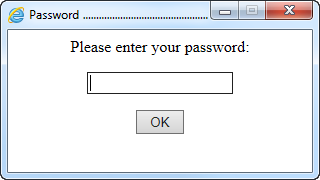
| InternetExplorer.Application | |
| VBScript Code: | |
Option Explicit

Dim strPw

strPw = GetPassword( "Please enter your password:" )
WScript.Echo "Your password is: " & strPw

Function GetPassword( myPrompt )
' This function uses Internet Explorer to
' create a dialog and prompt for a password.
'
' Version:             2.15
' Last modified:       2015-10-19
'
' Argument:   [string] prompt text, e.g. "Please enter password:"
' Returns:    [string] the password typed in the dialog screen
'
' Written by Rob van der Woude
' http://www.robvanderwoude.com
' Error handling code written by Denis St-Pierre
	Dim blnFavoritesBar, blnLinksExplorer, objIE, strHTML, strRegValFB, strRegValLE, wshShell

	blnFavoritesBar  = False
	strRegValFB = "HKEY_CURRENT_USER\Software\Microsoft\Internet Explorer\MINIE\LinksBandEnabled"
	blnLinksExplorer = False
	strRegValLE = "HKEY_CURRENT_USER\Software\Microsoft\Internet Explorer\LinksExplorer\Docked"

	Set wshShell = CreateObject( "WScript.Shell" )

	On Error Resume Next
	' Temporarily hide IE's Favorites Bar if it is visible
	If wshShell.RegRead( strRegValFB ) = 1 Then
		blnFavoritesBar = True
		wshShell.RegWrite strRegValFB, 0, "REG_DWORD"
	End If
	' Temporarily hide IE's Links Explorer if it is visible
	If wshShell.RegRead( strRegValLE ) = 1 Then
		blnLinksExplorer = True
		wshShell.RegWrite strRegValLE, 0, "REG_DWORD"
	End If
	On Error Goto 0

	' Create an IE object
	Set objIE = CreateObject( "InternetExplorer.Application" )
	' specify some of the IE window's settings
	objIE.Navigate "about:blank"
	' Add string of "invisible" characters (500 tabs) to clear the title bar
	objIE.Document.title = "Password " & String( 500, 7 )
	objIE.AddressBar     = False
	objIE.Resizable      = False
	objIE.StatusBar      = False
	objIE.ToolBar        = False
	objIE.Width          = 320
	objIE.Height         = 180
	' Center the dialog window on the screen
	With objIE.Document.parentWindow.screen
		objIE.Left = (.availWidth  - objIE.Width ) \ 2
		objIE.Top  = (.availheight - objIE.Height) \ 2
	End With
	' Wait till IE is ready
	Do While objIE.Busy
		WScript.Sleep 200
	Loop
	' Insert the HTML code to prompt for a password
	strHTML = "<div style=""text-align: center;"">" _
	        & "<p>" & myPrompt & "</p>" _
	        & "<p><input type=""password"" size=""20"" id=""Password"" onkeyup=" _
	        & """if(event.keyCode==13){document.all.OKButton.click();}"" /></p>" _
	        & "<p><input type=""hidden"" id=""OK"" name=""OK"" value=""0"" />" _
	        & "<input type=""submit"" value="" OK "" id=""OKButton"" " _
	        & "onclick=""document.all.OK.value=1"" /></p>" _
	        & "</div>"
	objIE.Document.body.innerHTML = strHTML
	' Hide the scrollbars
	objIE.Document.body.style.overflow = "auto"
	' Make the window visible
	objIE.Visible = True
	' Set focus on password input field
	objIE.Document.all.Password.focus

	' Wait till the OK button has been clicked
	On Error Resume Next
	Do While objIE.Document.all.OK.value = 0
		WScript.Sleep 200
		' Error handling code by Denis St-Pierre
		If Err Then	' User clicked red X (or Alt+F4) to close IE window
			GetPassword = ""
			objIE.Quit
			Set objIE = Nothing
			' Restore IE's Favorites Bar if applicable
			If blnFavoritesBar Then wshShell.RegWrite strRegValFB, 1, "REG_DWORD"
			' Restore IE's Links Explorer if applicable
			If blnLinksExplorer Then wshShell.RegWrite strRegValLE, 1, "REG_DWORD"
			' Use "WScript.Quit 1" instead of "Exit Function" if you want
			' to abort with return code 1 in case red X or Alt+F4 were used
			Exit Function
		End if
	Loop
	On Error Goto 0

	' Read the password from the dialog window
	GetPassword = objIE.Document.all.Password.value

	' Terminate the IE object
	objIE.Quit
	Set objIE = Nothing

	On Error Resume Next
	' Restore IE's Favorites Bar if applicable
	If blnFavoritesBar Then wshShell.RegWrite strRegValFB, 1, "REG_DWORD"
	' Restore IE's Links Explorer if applicable
	If blnLinksExplorer Then wshShell.RegWrite strRegValLE, 1, "REG_DWORD"
	On Error Goto 0

	Set wshShell = Nothing
End Function
|
|
 |
|
| Requirements: | |
| Windows version: | any |
| Network: | any |
| Client software: | Internet Explorer 4 or later |
| Script Engine: | WSH (CSCRIPT and WSCRIPT) (to use in HTAs, remove both WScript.Sleep lines) |
| Summarized: | Works in all Windows versions with Internet Explorer 4 or later, remove both WScript.Sleep lines to use in HTAs. |
| [Back to the top of this page] | |
page last modified: 2016-09-19; loaded in 0.0049 seconds


