


💾 Click the floppy disk or package (for third party scripts) 📦 icons to download the ZIPped sources
❔ Click the question mark icons to view the MD5 and SHA1 checksums for the ZIPped sources
| Batch file examples | |||||||
|---|---|---|---|---|---|---|---|
| 💾 | ❔ | Name | Version | Description | OS (1) | Last modified | Remarks |
| 💾 | ❔ | DateAdd.bat | 2.02 | Add/subtract a specified number of days to/from a specified date | XP | 2018-08-22 | Requires WMIC. For Windows XP and later. Based on Fliegel-Van Flandern Julian date conversion algorithms from the Astronomical Almanac, provided by Doctor Fenton on the Math Forum and converted to batch code by Ron Bakowski. |
| 💾 | ❔ | DateAddNT4.bat | 1.10 | Add/subtract a specified number of days to/from a specified date | NT | 2007-02-12 | Requires REGEDIT. For Windows NT4 and 2000. Based on Fliegel-Van Flandern Julian date conversion algorithms from the Astronomical Almanac, provided by Doctor Fenton on the Math Forum and converted to batch code by Ron Bakowski. |
| 💾 | ❔ | DateDiff.bat | 1.11 | Calculate the difference in days between two dates | XP | 2018-12-10 | Based on Fliegel-Van Flandern Julian date conversion algorithms from the Astronomical Almanac, provided by Doctor Fenton on the Math Forum and converted to batch code by Ron Bakowski. |
| 💾 | ❔ | DateFmt.bat | Show the current date in the specified format | NT | 2008-08-07 | Inspired by Simon Sheppard's GetDate.bat. | |
| 💾 | ❔ | DatePart.bat | 1.00 | Return the specified numerical part of the current date or time | NT | 2008-11-15 | Batch "wrapper" for VBScript's DatePart( ) function. |
| 💾 | ❔ | DatePart.cmd | 3.20 | Return the specified numerical part of the current date or time | XP | 2013-02-26 | Requires WMIC. |
| 💾 | ❔ | DateTime | Store week day, current date and current time in environment variables | All | Take a look at SortDate and SortTime for an NT version with language independent sorting, or at DateErrT for a version that uses ErrTime by Phil Money to remain virtually OS independent. | ||
| 📦 | ❔ | DateTime.cmd | Return the current date as errorlevel in YYYYMMDD format | XP | 2009-04-27 | Written by Justin. Works only in Windows XP. Requires modifications to work on non-US systems. |
|
| 💾 | ❔ | DDLU.bat | 1.00 | Don't Display Last Username: clears the last user name from the login dialog box permanently. | NT | 2001-12-20 | Use CLLUN.bat instead to remove the last logon user name just this once. See the Related Stuff section for a note on "Don't Display Last Username" in Vista and Windows 7. |
| 💾 | ❔ | DeadProf.bat | 1.00 | Delete inactive corrupted profiles for current user | NT | 2000-09-15 | |
| 💾 | ❔ | Dec2Bin.bat | Convert decimal numbers to binary | NT | 2010-07-15 | Requires PHP. | |
| 💾 | ❔ | Dec2Hex.bat | 3.00 | Convert a decimal number to "7.5" digit hexadecimal | NT | 2022-02-22 | This batch file uses a "poorly documented" feature of the PING command to convert a decimal number to hexadecimal. Also available in KiXtart, Perl, Rexx and VBScript. |
| 💾 | ❔ | Dec2Hex.bat | Convert decimal numbers to hexadecimal | NT | 2010-07-15 | Requires PHP. | |
| 💾 | ❔ | DecToBin.bat | 1.00 | Convert a decimal number to 31-bit binary | NT | 2022-03-13 | This batch file uses CMD.EXE's internal commands only. |
| 💾 | ❔ | DecToHex.bat | 2.01 | Convert a decimal number to "7.5" digit hexadecimal | NT | 2022-02-23 | This batch file uses CMD.EXE's internal commands only. Also available in KiXtart, Perl, Rexx and VBScript. |
| 📦 | ❔ | DecToHex3P.bat | 1.00 | Convert a decimal number to hexadecimal | NT | 2006-08-24 | Written by Richard K. Bussey. |
| 💾 | ❔ | DecToOct.bat | 1.01 | Convert a decimal number to "10.5" digit octal | NT | 2022-02-23 | This batch file uses CMD.EXE's internal commands only. |
| 💾 | ❔ | DefaultQuickEditMode.bat | 1.00 | Get or set the default Quick-Edit mode for console windows | NT | 2022-03-19 | |
| 💾 | ❔ | DefOpen.bat | 3.00 | Create a default file association to Notepad and add "Open with Notepad", "Print with Notepad" and "Command Prompt Here" options to popup menus | 95 98 NT 2000 XP | 2007-11-21 | Based on a tip by Regedit.com. More details on my REGEDIT page. |
| 💾 | ❔ | DefPRN.bat | Display default printer name | NT | 1999-11-07 | Also available as OS/2 Rexx, Windows Rexx, JScript, KiXtart, Perl and VBScript scripts. | |
| 💾 | ❔ | DefPRN2K.bat | 1.00 | Display default printer name | W2K | 2002-02-13 | Also available as OS/2 Rexx, Windows Rexx, JScript, KiXtart, Perl and VBScript scripts. |
| 💾 | ❔ | DelFlash.bat | 2.01 | Delete "Local Shared Objects", a.k.a. "Flash Cookies", from the current user's profile | NT | 2015-10-20 | Use entirely at your own risk!. |
| 💾 | ❔ | DelOutlX.bat | Uninstall Outlook Express (BETA!) | W2K | 2003-12-20 | Tested on 1 Windows 2000 computer only. Use entirely at your own risk!. |
|
| 💾 | ❔ | DelProf.bat | Delete specified profile (BETA!) | NT | 2003-12-17 | Still in beta! That is why the most destructive command of the batch file is echoed only. | |
| 💾 | ❔ | Desktop.bat | 2.00 | Save all desktop shortcuts as a batch file that can recreate those shortcuts again (Desktop backup) | NT | 2001-08-05 | Requires SHORTCUT. |
| 📦 | ❔ | DHCPScopes.bat | 6.8.18 | List all authorized DHCP servers on the domain and log all active scopes | XP | 2006-08-17 | Requires NETSH. Written by Josh Murray. |
| 💾 | ❔ | DirComp.bat | 3.30 | Compare the total number of files, total file size, timestamps and contents of 2 directories | NT | 2014-10-01 | Requires FCIV. Uses FC to compare FCIV listings of the 2 directories, so the lines preceeding and following the detected differences will also be displayed on screen. |
| 💾 | ❔ | Disabled.bat | 1.00 | Lists all disabled user accounts | NT | 2000-09-21 | |
| 💾 | ❔ | DisableCompatTelRunner.bat | 1.00 | Disable scheduled Application Experience tasks to speed up Windows startup | W7 | 2017-05-09 | |
| 💾 | DiskFree | Check amount of free disk space, the hard way | All | Use FreeSpace.vbs if you need a more reliable tool. | |||
| 💾 | ❔ | DiskSpc.bat | 3.10 | Display harddisk summary for any WMI enabled computer or for a list of computers | XP | 2006-10-02 | Requires WMIC. |
| 💾 | ❔ | DiskUse4.bat | 4.20 | List the disk usage for every subdirectory | NT4 | 2014-10-01 | Returns negative numbers if total file sizes exceed 2GB. Also available as Rexx script. |
| 💾 | ❔ | DiskUse.bat | 5.10 | List the disk usage for every subdirectory | W2K | 2014-10-01 | Fixed negative numbers bug for Windows 2000/XP. Also available as Rexx script. |
| 💾 | ❔ | DispEDID.bat | 1.01 | Display your monitor's EDID asset information | XP | 2007-02-20 | Also available in VBScript. |
| 💾 | ❔ | Dll_Menu.bat | 1.01 | Add "Register" and "Unregister" to Explorer's context menu for DLLs and OCXs | W2K | 2014-10-01 | |
| 💾 | ❔ | dNFxVer.bat | 1.01 | List the installed .NET Framework versions | W2K | 2010-08-26 | Requires GetUnins.vbs. Windows 2000 and XP only. |
| 💾 | ❔ | DNSServers.bat | 1.00 | List the configured DNS servers for each network adapter | XP | 2011-11-17 | Requires WMIC. |
| 💾 | ❔ | DotNetFxVer.bat | 1.01 | List installed .NET Framework versions for any computer | W2K | 2017-06-16 | Unlike similar batch files that query the registry, this one checks mscorlib.dll's file version. |
| 💾 | ❔ | DriveRdy.bat | Check if (removable) drive is ready | DOS6+ OS2 | 1999-07-18 | Also available as OS/2 Rexx script. | |
| 💾 | ❔ | Drives.bat | 2.01 | List drive letters and types | XP | 2012-04-20 | Requires WMIC. |
| 💾 | ❔ | DrivesXPHome.bat | 1.01 | List local drive letters and types | W2K | 2003-12-17 | This version is for Windows 2000 and XP Home only. |
| 💾 | ❔ | DrivUsed.bat | 1.00 | List used and available drive letters | XP | 2007-12-30 | |
| 💾 | ❔ | DxSound.bat | 1.00 | List selected DirectX properties for all sound devices | XP | 2011-09-23 | Requires DxDiag.exe (native) and XML Starlet. |
| 💾 | ❔ | DxVideo.bat | 1.01 | List selected DirectX properties for all video cards/monitors | XP | 2011-09-23 | Requires DxDiag.exe (native) and XML Starlet. |
| Notes: | (1) | Operating System version these batch files were written for | |
|---|---|---|---|
| All | No version specific commands are used, though it is (obviously) not tested with every DOS version available | ||
| 95 | Windows 95 (and probably Windows 98 as well) | ||
| 98 | Windows 98 | ||
| DOS3 | MS-DOS 3 and 4 | ||
| DOS6+ | MS-DOS 6 and later | ||
| NT | Windows NT 4 and later | ||
| NT4 | Windows NT 4 (Windows NT 4 Terminal Server Edition too) | ||
| W2K | Windows 2000 and later | ||
| XP | Windows XP | ||
| W2K3 | Windows Server 2003 | ||
| W2K8 | Windows Server 2008 | ||
| W10 | Windows 10 | ||
| WV | Windows Vista | ||
| W2K8R2 | Windows Server 2008 Release 2 | ||
| W7 | Windows 7 | ||
| OS2 | OS/2 Warp | ||
| TS | Windows NT 4 Terminal Server Edition, or Windows Server 200* with Terminal Services | ||
SECPOL.MSC and navigate to "Security Settings", "Local Policies", "Security Options" and find the "Interactive logon" settings in the right pane.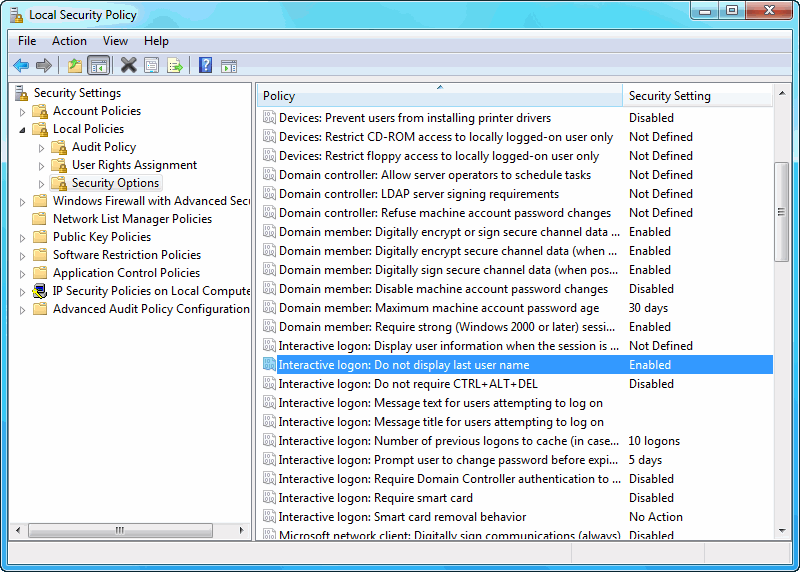
page last modified: 2024-04-20; loaded in 0.0351 seconds


